Virtual Charades Mastery: Boost Team Bonding with a Free Charades Generator
Are your virtual team meetings feeling more like a chore than a connection? Remote work breeds ‘Zoom fatigue.’ Leaders and HR teams struggle daily to foster authentic connections through screens. You need an activity that is simple, engaging, and breaks through the digital barrier to create shared moments of laughter and collaboration. It's time to rediscover a classic game, reimagined for the modern workplace.
Let’s dive into how you can host laugh-out-loud virtual charades sessions! We’ll cover the simple tech setup, how to generate fun ideas, and tips for facilitating a session everyone will remember. Imagine this: Your team erupts in laughter as a colleague acts out ‘disco-dancing robot’—all thanks to our free charades generator. No more scrambling for ideas or awkward silences. It’s time to revitalize your online gatherings.
Setting Up for Success: Virtual Charades Tech & Tools
Before the fun can begin, a little technical preparation ensures a smooth and frustration-free experience for everyone. The goal is to make the technology disappear, so the focus remains on the performance and the guessing. Getting the setup right is the first step toward a successful virtual team-building game.
Choosing the Best Virtual Platform for Charades (Zoom, Teams, etc.)
Most modern video conferencing platforms work perfectly for charades. The key is to use a tool your team is already comfortable with.
- Zoom: Excellent for its "Spotlight" feature, which allows the host to make the performer's video the main screen for all participants. Its private chat is also perfect for sending the secret word to the actor.
- Microsoft Teams: Similar to Zoom, you can "Spotlight" a participant. The private chat function works seamlessly for sharing clues with the designated performer.
- Google Meet: While it lacks a dedicated spotlight feature, you can "pin" a participant's video to your own screen. The host can instruct everyone to pin the current performer for the best view.
The best platform is the one that requires the least amount of training for your team. Simplicity is key.
Screen Sharing & Virtual Background Tips for Performers
Visual clarity is crucial in a game where no words are spoken. To ensure everyone can see the actor clearly, share these simple tips with your team before you start.
- Use a Simple Background: Encourage performers to use a blurred or simple virtual background. A busy or distracting background can make it hard to see their movements.
- Good Lighting is Essential: The actor should be well-lit from the front. Sitting with a bright window behind them will turn them into a silhouette, making gestures impossible to see.
- Private Clue Delivery: The host should use the private chat feature to send the charade prompt only to the person whose turn it is. This prevents others from accidentally seeing the answer.
Your Pre-Game Checklist for Seamless Charades Generator Sessions
A quick five-minute check can prevent the most common technical hiccups. Share this checklist with your team in the meeting invitation so they can come prepared.
-
Stable Internet Connection: A wired connection is ideal, but a strong Wi-Fi signal is usually sufficient.
-
Test Your Camera and Mic: Ensure both are working properly before the game begins.
-
Frame Yourself Well: Adjust your camera so your upper body and arms are clearly in the frame.
-
Close Unnecessary Tabs: This frees up bandwidth and reduces potential distractions.
-
Have the Game Tool Ready: As the host, have the charades word generator open in a separate browser tab, ready to go.

Unlocking Engaging Remote Charades Ideas with Our Generator
The single biggest challenge of any charades game is coming up with a steady stream of good words and phrases. This is especially true in a professional setting where you need appropriate and universally understood prompts. Constantly thinking of new ideas on the spot can drain the energy out of the session. This is where an online generator becomes your most valuable asset.
Selecting Categories Perfect for Remote Players
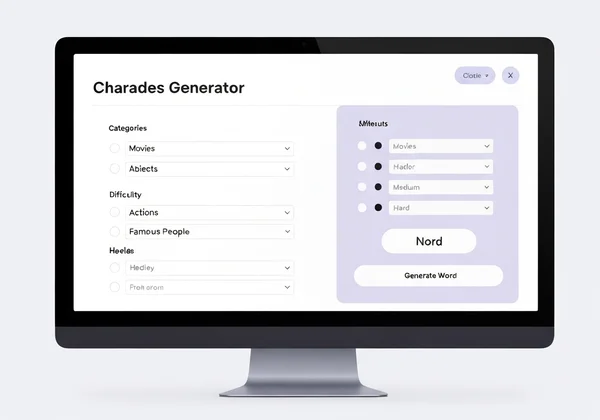
The beauty of a tool like the Charades Generator is its vast library of categories. For a remote team, it’s best to stick to topics that are widely known and don't rely on specific cultural or office-insider knowledge, especially for new teams.
Great starting categories include:
- Movies: A classic choice with endless possibilities.
- Famous People: From scientists to celebrities, these are often fun to act out.
- Objects: Everyday items that are easy to gesture.
- Actions: Simple verbs like "running," "singing," or "typing."
By using a random charades generator, you ensure fairness and variety, keeping the game fresh and exciting for everyone involved.
Adapting Difficulty Levels for Diverse Virtual Groups
Every team is a mix of personalities and backgrounds. Some members might be natural performers, while others may be more reserved. A great facilitator makes everyone feel comfortable, and choosing the right difficulty level is a huge part of that.
- Easy: Perfect for a warm-up round or for teams new to the game. These are typically simple, one-word concepts like "dog" or "book."
- Medium: Introduces more complex ideas or short phrases, like "watching a movie" or "baking a cake." This is a great standard level for most teams.
- Hard: For the seasoned charades pros! These can be abstract concepts, movie titles, or complex phrases that require creative thinking and teamwork to guess.
Starting on "Easy" helps build confidence and gets everyone laughing, setting a positive tone for the rest of the activity.
How CharadesGenerator.cc Delivers Endless Creative Prompts
As a facilitator, your main job is to manage the group’s energy and participation—not to moonlight as a content creator. Wasting precious time brainstorming words is inefficient. This is the core problem that CharadesGenerator.cc solves.
With a single click, you get instant access to a massive database of prompts across multiple categories and difficulties. There is no need to sign up or download anything. You simply visit the website, choose your settings, and start the game. This immediate access to endless creative prompts means you can focus on what truly matters: your team. Ready to see how easy it is? Generate instant charades prompts with our free tool and get your first prompt in seconds.
Facilitating Fun: Charades Team Building for Remote Groups
Tools matter, but your role as facilitator is key. Set the stage, guide the game, and keep spirits high. Think of yourself as the "host of the party," making sure everyone has a great time.
Setting Clear Virtual Rules & Time Limits for Fair Play
Clear, simple rules prevent confusion and keep the game moving. Before you start, briefly explain the basics:
- The Goal: One person (the actor) will act out a word or phrase without speaking or making any noise.
- The Rules: The actor cannot point to objects in their room or draw letters in the air.
- The Timer: Each person has a set amount of time to act (60-90 seconds is a good starting point). The CharadesGenerator.cc has a built-in timer to make this easy.
- Guessing: The rest of the team guesses out loud. The first person to guess correctly wins a point for their team (if playing in teams).
Using a timer is crucial. It adds a fun sense of urgency and ensures that no single turn drags on for too long.
Encouraging Participation & Energy in Online Settings
In a virtual environment, it’s important to be proactive about engagement. Some people may be hesitant to jump in, especially if they are shy.
-
Start with a Volunteer: Ask for a volunteer to go first. This is often the most enthusiastic person on the team and sets a positive example.
-
Use Teams: Divide the group into two or more teams. This fosters friendly competition and takes the pressure off individuals. People are often more comfortable when they are part of a team effort.
-
Celebrate Every Attempt: Cheer for both the actors and the guessers. The goal is participation and fun, not winning. Acknowledge a great acting effort even if the team doesn’t guess the word in time.
Troubleshooting Common Virtual Charades Issues & Keeping the Flow
Even with perfect planning, small issues can arise. A prepared facilitator can handle them smoothly without disrupting the game.
- Problem: Someone's internet is lagging.
- Solution: Have them turn off their camera when it's not their turn to act. If the problem persists, gently skip their turn and come back to them later.
- Problem: A prompt is too difficult or culturally specific.
- Solution: Allow the actor one "pass" per game. They can privately message you for a new word from the charades ideas generator.
- Problem: The group is quiet or low-energy.
- Solution: As the facilitator, jump in with some enthusiastic guesses yourself. Your energy is contagious. You can also play some upbeat music softly in the background.
Ready to Energize Your Remote Team? Your Charades Adventure Awaits!
Moving from a disengaged virtual meeting to a session filled with laughter and team spirit is easier than you think. Virtual charades is a powerful, low-cost, and incredibly effective way to break the ice, encourage creative thinking, and build the personal connections that are vital for any successful remote team.
Follow these setup steps. Use an instant idea generator. Prioritize fun. Boom—your team-building session is unforgettable! The biggest hurdle—coming up with endless fun ideas—is solved. With a quality charades generator, your team stays engaged and the laughter keeps flowing. Your next great team meeting is just a click away.
Ready to stop planning and start playing? Get started now and bring your remote team together with the simple joy of charades.
Your Virtual Charades Questions Answered
How do you play charades virtually on platforms like Zoom or Teams?
Playing charades on a video call is simple. First, gather your team in the meeting. As the host, open the Charades Generator on your browser. For each round, choose one person to be the "actor" and send them a word or phrase using the private chat feature. The actor then spotlights their video (or is pinned by everyone) and acts out the prompt while the rest of the team guesses out loud.
What are some good charade ideas specifically for remote team building?
While classic categories like movies and songs are great, you can tailor the game to your team. Consider work-related themes like "Office Activities" (e.g., making coffee, a long meeting) or "Common Business Jargon" (e.g., synergy, low-hanging fruit). However, for inclusivity, it's often best to start with universally understood topics that a free charades generator provides, ensuring everyone can participate equally.
How can you make virtual charades more fun and engaging for a large group?
For groups larger than 10-12 people, it’s best to use breakout rooms. Divide the group into smaller teams of 4-5 people and send each team to a separate room with a designated leader. Let them play a few rounds in their small groups. Then, bring everyone back to the main room for a "championship" round where the winner from each breakout room performs for the entire company. This keeps everyone engaged and adds a layer of exciting competition.